

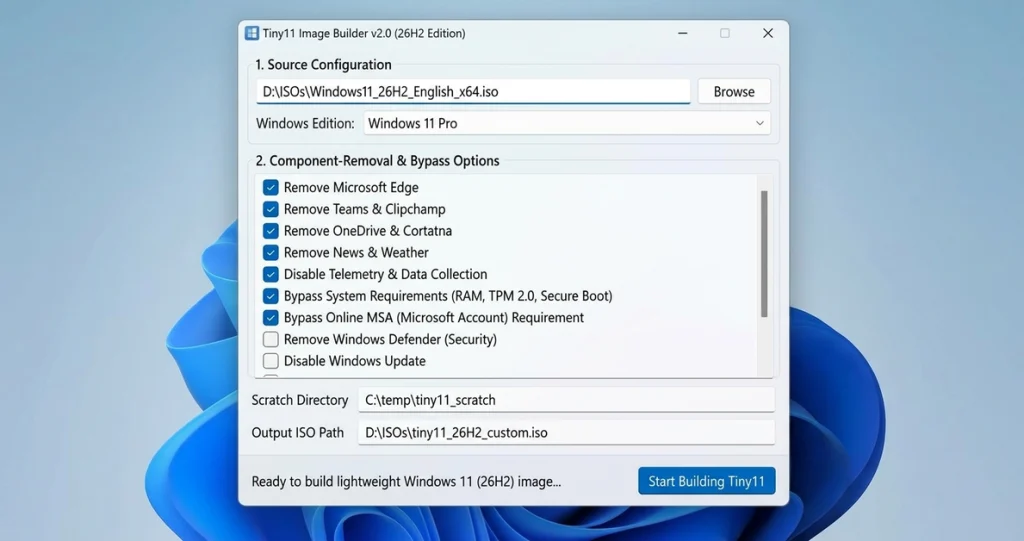
NTDEV, the developer behind Tiny11, posted a teaser on October 10, 2026: “Tiny11, reimagined from the ground up. Coming soon,” alongside a screenshot of the Tiny11 Builder interface. That’s the entire official announcement. No release date, no feature list, no confirmed list of supported Windows versions, and nothing about Tiny11 26H2 specifically. Everything beyond that single line is tech press speculation, some of it reasonable, none of it confirmed by NTDEV.
What Tiny11 Actually Is
Tiny11 is an open-source tool, first released in February 2023, that strips components out of a Windows 11 image to produce a smaller, lighter installation. It’s built and maintained by NTDEV, published on GitHub as ntdevlabs/tiny11builder, and it works by removing packages from a Windows 11 ISO you supply yourself, not by downloading a prebuilt image from a third party. NTDEV has specifically recommended building your own image rather than trusting a prebuilt Tiny11 ISO found elsewhere online, since there’s no way to verify what a stranger’s modified Windows image actually contains.
The project’s most recent GitHub release, from September 2025, added removal of Copilot, the newer Outlook client, and Teams packages, along with registry keys to keep Copilot disabled and stop those apps from reinstalling themselves. Before that, a November 2024 release added support for Windows 11 24H2. Nothing in the current public release notes mentions Windows 11 26H2.
What NTDEV Actually Announced
The entire confirmed announcement is the October 10 post: a short line of text and one screenshot of the builder’s interface. NTDEV didn’t name which Windows 11 versions the rebuilt tool will cover, didn’t describe what’s changing under the hood, and didn’t say anything about bypassing Microsoft’s installation requirements. “Reimagined from the ground up” is NTDEV’s own phrase, and until release notes or an updated repository show what actually changed, it’s marketing language for an unreleased tool, not a technical spec.
What’s Speculation About Tiny11 26H2, Not Confirmation
Several outlets covering the teaser, including Neowin and Windows Report, expect the rebuilt Tiny11 to cover Windows 11 from 22H2 through 26H2, since that’s the full span of currently serviced versions. That’s a reasonable guess given Tiny11’s history of chasing new Windows releases, but it’s their inference, not something NTDEV stated. The headline framing you’ll see elsewhere, that Tiny11 26H2 is specifically coming to unsupported PCs, runs ahead of what’s actually been confirmed so far.
A separate tool called POP4.2 has come up in coverage of this story as something that works around CPU instruction-set requirements on unsupported hardware. It isn’t part of Tiny11, isn’t made by NTDEV, and reporting on it so far hasn’t included enough technical detail to verify independently what it does or how. Treat any claim that pairs it with a rebuilt Tiny11 26H2 release as speculation layered on top of speculation.
What Tiny11 Does and Doesn’t Bypass
This is where the existing (pre-rebuild) Tiny11 Builder’s real behavior matters more than the teaser. Removing components from a Windows 11 image can get a build through setup without a Microsoft account and without the installer’s TPM 2.0 and minimum CPU/RAM checks blocking it, since those checks live in the setup process the stripped-down image no longer enforces the same way. What it does not do is change the actual hardware underneath. A CPU that’s missing instructions Windows 11 depends on, or a motherboard with no TPM chip at all, doesn’t become compatible just because the installer stopped asking. Driver support, stability, and whether security features like virtualization-based security still function are separate questions a lighter installer doesn’t answer.
Tiny11 Core, a related but distinct project from the same developer, strips even further, including removing Windows Defender entirely. It’s explicitly a testbed for rapid experimentation, not a daily-driver replacement for Tiny11 Builder, and its much higher risk profile shouldn’t be assumed to carry over to the regular builder.
The Real Risk of Running Windows 11 on Unsupported Hardware
Microsoft’s own position on this hasn’t changed regardless of what Tiny11 does: installing Windows 11 on a PC that doesn’t meet Microsoft’s minimum system requirements “is not recommended,” and such PCs “will no longer be supported and won’t be entitled to receive updates,” per Microsoft’s own documentation on the subject. That’s true whether the install came from a standard Microsoft ISO with the registry bypass method or from a Tiny11 26H2 build once one actually exists. A rebuilt Tiny11, whatever it ends up supporting, doesn’t change Microsoft’s support posture on the hardware underneath it.
The practical risks worth weighing before installing any stripped-down Windows image on unsupported hardware: security and feature updates may behave unpredictably since Microsoft isn’t testing against that configuration, removed components can break things you didn’t expect to depend on them, and driver availability on older hardware tends to get worse over time, not better, as a Windows version ages.
If You Want to Try It Anyway
Nothing about the rebuild is available to test yet, so there’s no Tiny11 26H2 build to install today. Once NTDEV publishes something concrete, the safer path is the same one NTDEV already recommends for the current Tiny11 Builder: supply your own legitimately obtained Windows 11 ISO, run the builder yourself rather than downloading someone else’s finished image, and treat the result as something to test on a spare or secondary machine first, not a production PC. For the officially supported side of 26H2, the enablement-package rollout and install steps are a different process entirely from anything Tiny11 touches.
Is Tiny11 26H2 available to download right now?
No. NTDEV’s October 10, 2026 post is a teaser with no release date, no download, and no confirmed feature list.
Does the rebuilt Tiny11 confirmed support Windows 11 26H2?
Not confirmed by NTDEV. Tech press coverage expects coverage of 22H2 through 26H2 based on Tiny11’s history, but that’s inference, not an announced feature.
Does Tiny11 bypass TPM and CPU requirements for Windows 11?
The existing Tiny11 Builder can get an install through setup without those checks blocking it, since it strips components involved in that enforcement. It doesn’t change whether the underlying hardware is actually compatible, and Microsoft still won’t support or update a PC that doesn’t meet its minimum requirements.
What is POP4.2, and is it part of Tiny11?
It’s a separate tool mentioned in coverage of this story, said to work around CPU instruction-set requirements on unsupported hardware. It isn’t made by NTDEV and isn’t part of the Tiny11 project.
Is it safe to download a prebuilt Tiny11 ISO instead of building my own?
NTDEV specifically advises against it. A prebuilt image from an unknown source can’t be verified, and building your own from a legitimate Windows 11 ISO using the published Tiny11 Builder tool is the recommended approach.
Related Articles
Anchor Text: the enablement-package rollout and install steps (linked inline above) Target: https://sysarticle.com/windows-11-26h2-released/
References
Windows Forum: Tiny11 Rebuilt Teased: Windows 11 26H2 Support and New Features Still Unconfirmed https://windowsforum.com/news/tiny11-rebuilt-teased-windows-11-26h2-support-and-new-features-still-unconfirmed.448022/
Windows Report: Tiny11 Could Soon Bring Lightweight Windows 11 26H2 to More PCs https://windowsreport.com/tiny11-could-soon-bring-lightweight-windows-11-26h2-to-more-pcs/
GitHub: ntdevlabs/tiny11builder Releases https://github.com/ntdevlabs/tiny11builder/releases
PC Games Hardware: Neuauflage von Tiny11 kann jetzt alle Versionen und Builds schrumpfen https://www.pcgameshardware.de/Windows-Software-277633/News/Neue-Version-von-Tiny11-1445950/


